راهنمای ساخت تصویر Paper Cut Collage با ChatGPT و Higgsfield
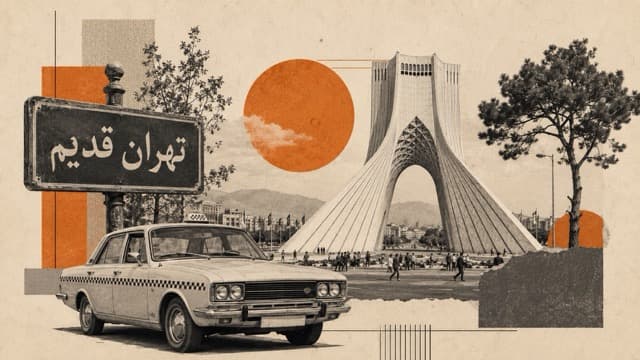
راهنمای گامبهگام ساخت تصویر Paper Cut Collage با ChatGPT و Higgsfield، از پیدا کردن تصویر مرجع در Pinterest تا ساخت ویدیو با Seedance.
مرحله ۱. پیدا کردن تصویر مرجع
اول وارد Pinterest شوید.
در Pinterest این عبارت را سرچ کنید:
paper cut collage poster
یک تصویر پیدا کنید که سبک، ترکیب بندی، رنگ، حس و حال یا چیدمان آن را دوست دارید.
بعد تصویر را کپی کنید یا اسکرین شات بگیرید و داخل ChatGPT آپلود کنید.
همراه با تصویر، پرامپتی که پایین قرار داده شده را هم در ChatGPT قرار دهید.
مرحله ۲. تکمیل پرامپت
در پرامپت، بخشهایی که داخل [ ] نوشته شدهاند را با اطلاعات دلخواه خودتان پر کنید.
ترجمه بخشهای مهم:
Main subject یعنی سوژه اصلی
Text to include یعنی متنی که میخواهید داخل تصویر باشد
Colour palette یعنی پالت رنگی
Main elements to include یعنی عناصر اصلی که باید داخل تصویر باشد
Extra elements to add یعنی عناصر اضافی یا جزئیات تکمیلی
Mood یعنی حس و حال تصویر
Aspect ratio یعنی نسبت تصویر
اگر به هر کدام از این بخشها نیاز ندارید، آن بخش را حذف کنید.
مثلاً اگر نمیخواهید متنی روی تصویر باشد، در بخش Text to include بنویسید:
No text.
نکته مهم:
این پرامپت در زبان انگلیسی خیلی بهتر کار میکند.
اگر ایده شما فارسی است، یک چت جدید در ChatGPT باز کنید، ایده خودتان را فارسی بنویسید و از ChatGPT بخواهید آن را به انگلیسی تبدیل کند.
بعد متن انگلیسی را داخل بخشهای [ ] قرار دهید.
PROMPT TEMPLATE:
PROMPT TEMPLATE
Act as a professional image prompt engineer.

I will upload one reference image. Analyse the uploaded image carefully and create one complete image generation prompt that transforms it into a paper cut collage artwork.

Use the uploaded image as the main visual reference, but follow the custom details below.

CUSTOM DETAILS TO FOLLOW:

Main subject:
[Write what the main subject should be. Example: old Tehran, football strategy, AI leaders, financial system, fashion portrait]

Text to include:
[Write the exact text that must appear in the image. Example: تهران قدیم]
If no text is needed, write: No text.

Colour palette:
[Write the colours you want. Example: beige, orange, black and white]
Use these colours as the main palette and keep the image visually balanced.

Main elements to include:
[Write the important objects, people, places, symbols, or details you want in the image. Example: Azadi Tower, Peykan taxi, street sign, old city textures]

Extra elements to add:
[Write any supporting details. Example: torn paper circles, grid lines, vintage trees, city textures, football pitch, fans, data lines, receipts]

Mood:
[Write the feeling you want. Example: nostalgic, premium, dramatic, cultural, playful, futuristic, editorial]

Aspect ratio:
[Write the aspect ratio. Example: 16:9 landscape, 4:5 Instagram post, 9:16 story, portrait poster]

Text rules:
Only include the exact text I wrote above.
Do not add extra text.
Do not add logos.
Do not add branding.
Do not add watermark.

Now create the final image generation prompt.

The final prompt must:
Analyse the uploaded image and preserve its strongest visual idea, layout, and atmosphere.
Transform the image into a premium paper cut collage artwork.
Use layered cutout paper elements, torn paper edges, handmade paper texture, realistic paper shadows, overlapping magazine cutouts, subtle grain, halftone texture, distressed print details, and editorial poster composition.
Keep the main subject clear and visually strong.
Use the colour palette I provided.
Include the main elements and extra elements I provided.
Make the composition balanced, artistic, and professional.
Make sure the final prompt is detailed enough for an image generation tool.

Final output:
Give me only one complete image generation prompt.
Do not explain.
Do not give options.
Do not generate the image.
اگر میخواهید حرفهایتر با هوش مصنوعی محتوا تولید کنید، از ایده تا تصویر، ویدیو و اتوماتیکسازی، ورکشاپ تولید محتوا با AI ما را از دست ندهید.
مرحله ۳. ساخت تصویر
وقتی ChatGPT پرامپت نهایی را به شما داد، میتوانید همان پرامپت را به ChatGPT بدهید و از آن بخواهید تصویر را برای شما بسازد.
یا میتوانید از ابزارهای دیگر مثل Nano Banana 2 در Higgsfield یا هر پلتفرمی که اکانت دارید استفاده کنید.
پرامپت نهایی را داخل ابزار ساخت تصویر قرار دهید.
سایز یا نسبت تصویر مورد نظر خودتان را انتخاب کنید.
بعد تصویر را generate کنید.
مرحله ۴. تبدیل تصویر به ویدیو در Higgsfield
بعد از اینکه تصویر نهایی را ساختید، وارد Higgsfield شوید.
برای این بخش باید در Higgsfield اکانت داشته باشید.
داخل Higgsfield به بخش Video بروید.
روی Seedance کلیک کنید.
مدل Seedance Mini را انتخاب کنید.
زمان ویدیو، سایز ویدیو و کیفیت ویدیو را انتخاب کنید.
تصویری که ساختهاید را آپلود کنید.
کمی صبر کنید تا تصویر کامل آپلود شود. این مرحله ممکن است ۱ تا ۲ دقیقه طول بکشد.
بعد از آپلود تصویر، پرامپت زیر را وارد کنید:
ANIMATION PROMPT:
ANIMATION PROMPT
Animate the uploaded image as a paper collage assembly.

Start from a plain empty background with only subtle texture.

Bring every separate piece of the collage into the scene one by one.

Each cutout, paper layer, object, character, detail, and background element should slide, drop, or gently float into its final position.

Make the movement feel like real physical paper pieces being placed together.

Use natural paper shadows, torn edges, slight depth, soft parallax, and small imperfections.

The animation should gradually build from an empty background into the full final composition.

Keep the final frame exactly the same as the uploaded reference image.

Do not add new elements.

Do not remove any elements.

Do not change the composition.

Do not change the characters, faces, objects, colours, or style.

Use smooth cinematic motion, light camera movement, subtle zoom, and realistic paper texture.

The final result should feel like a premium handmade paper collage coming together piece by piece.

No text.

No logo.

No extra graphics.

Keep the same aspect ratio as the uploaded image.
مرحله ۵. ساخت ویدیو
بعد از وارد کردن پرامپت، روی Generate بزنید.
صبر کنید تا ویدیو ساخته شود.
در پایان، شما یک تصویر Paper Cut Collage دارید که به شکل تکههای کاغذی و مرحله به مرحله وارد صحنه میشود و به ترکیب نهایی تبدیل میشود.
اگر میخواهید حرفهایتر با هوش مصنوعی محتوا تولید کنید، از ایده تا تصویر، ویدیو و اتوماتیکسازی، ورکشاپ تولید محتوا با AI ما را از دست ندهید.